How to sort YouTube search results by upload date or views
In January 2026 YouTube took Sort by upload date and View count out of its search filters. The menu is now called Prioritize and offers Relevance and Popularity, nothing else. Here is what still works, what does not, and how to get results newest first again.
What changed in YouTube's search filters
Until January 2026 a search could be sorted by Relevance, Upload date, View count or Rating. In January YouTube replaced that menu with Prioritize, which has two options:
- Relevance, the default order.
- Popularity, which took the place of View count. YouTube says it weighs views together with signals such as watch time, so it is not a strict ranking by views.
Sorting by upload date and by rating went away, and so did the Last hour filter; YouTube said the last two were not working as expected. What it kept are the filters: Upload date (Today, This week, This month, This year), Type (Videos, Shorts, Channels, Playlists, Movies), Duration (Under 3 minutes, 3–20 minutes, Over 20 minutes) and Features such as Live, 4K or Subtitles/CC. That is exactly what the filters panel on youtube.com still showed when we checked again on 20 November 2026.
The workaround YouTube offers: filter by upload date
Search, open Filters and pick Today or This week. Every result is now recent, but the list is still in relevance order: a video from twenty minutes ago can sit below one from five days ago. For breaking news that is often good enough. For "show me the newest video first", it is not.
For other dates, YouTube search understands after: and before:. cake recipe after:2026-11-01 returns only videos uploaded since 1 November, and before:2015-01-01 only those from before 2015. They narrow the results the way the filter does and, like it, they do not sort: the newest video is still mixed in with the rest.
Why the old links no longer work
Sorted searches used to have their own links, and some guides still tell you to add them to the address bar. We tried both again on 20 November 2026. The old upload-date link returned the results in the same order as a plain search. The old view-count link put a few very big videos first and then mixed in smaller, newer ones, which is the Popularity order rather than a sort by views. Neither is a way back.
Sort the results newest first, or by views
- Add Sortflare to Chrome. It is free and needs no account.
- Search on youtube.com. Add the filters you want first: This week to keep it recent, Videos or Shorts to pick a format.
- Press Alt+S, choose how many results to load and sort by Date, newest first. Or sort by Views.
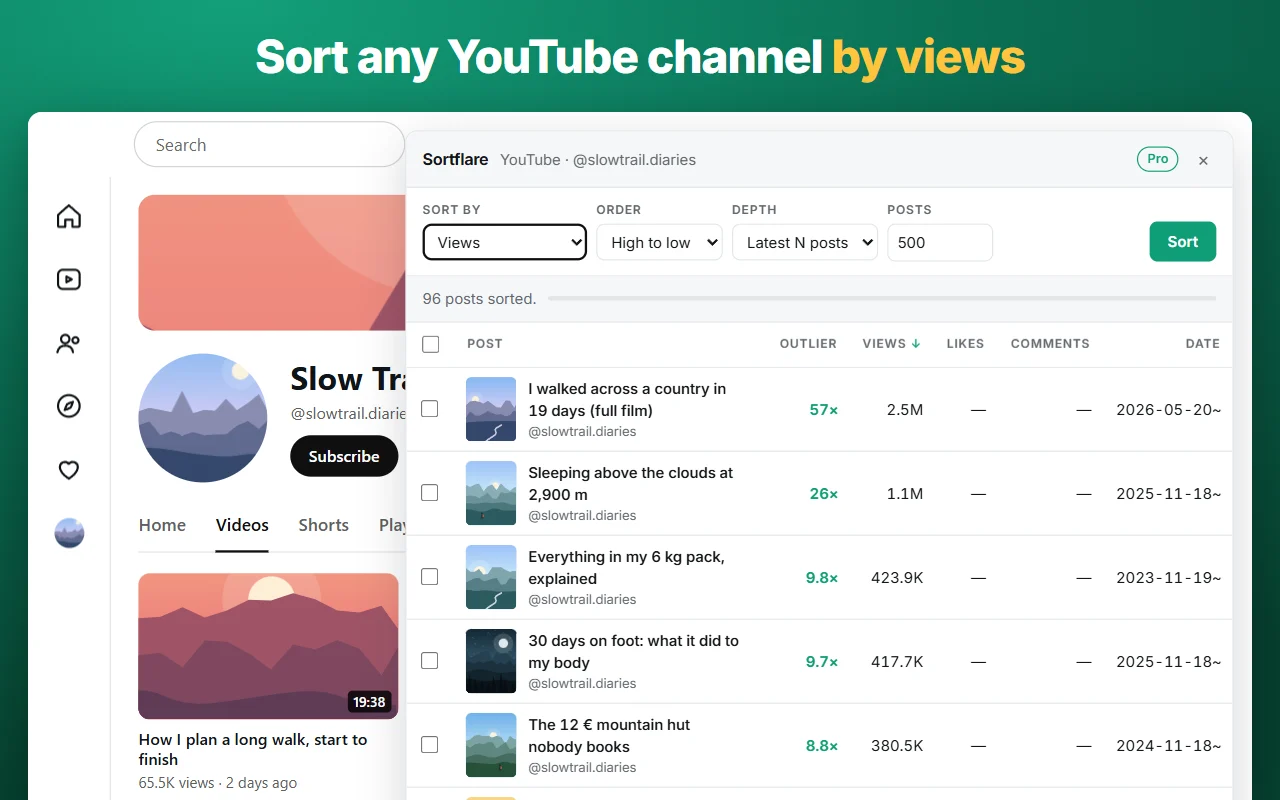
Sortflare scrolls the results page to load them, as you would, and lists them in its panel in the order you asked for, each with its views, its date and a link to the video. The page itself stays as YouTube drew it. Flip the direction to get the oldest first, or the least viewed, which is how you find small channels inside a big topic.
How exact the dates are
Search results say how long ago each video went up, such as "14h ago" or "3w ago", not the exact day. Sortflare sorts by that, so with the Today or This week filter the order is right to the hour or the day. Further back, two videos that both say "1y ago" can come out in either order. Shorts in search results carry no date at all, so they sort by views but not by date. For the exact upload date of one video, open it.
Sort by length, or by real view count
The Duration filter only puts results into three buckets. Sort by Duration instead and the longest or the shortest comes first. Sorting by Views uses each video's own count, so it is the old View count sort and not Popularity's mix.
On a channel page, YouTube still sorts
None of this changed on channels. A channel's Videos tab still has Latest, Popular and Oldest chips, and the Oldest chip shows its first video. What a channel cannot do is rank its videos by how far each one beat its usual views. Sortflare does that on YouTube channels with the outlier score, and the same works for a channel's Shorts.
What it cannot do
Sortflare sorts the results YouTube returns for your search; it cannot add videos YouTube does not show you. The free plan sorts the first 25 results. Pro loads 50, 200 or 1,000, or keeps going until YouTube stops returning more. It runs in a desktop browser, not in the YouTube app.
Questions
Did YouTube remove sort by upload date?
Yes, from search, in January 2026. The Sort by menu became Prioritize, with only Relevance and Popularity. The upload date filters (Today, This week, This month, This year) are still there, but they narrow the results without putting them in date order.
Is there a URL or setting that brings it back?
Not any more. On 20 November 2026 the old upload-date link returned results in the same order as a plain search, and the old view-count link returned big videos first with smaller, newer ones mixed in. There is no setting for it on youtube.com or in the app.
Can I still sort YouTube search by view count?
Not by the raw count. Popularity weighs views together with watch time and relevance, so the order is not strictly by views. Sortflare sorts the results by their view counts, highest or lowest first.
Does it work for Shorts?
By views, yes: set the Type filter to Shorts and sort by Views. YouTube shows no date on Shorts in search results, so they cannot be sorted by date, but the Upload date filter still narrows them to today, this week, this month or this year. To sort one channel's Shorts, open its Shorts tab instead.
Does it work in the YouTube app?
No. Sortflare is a browser extension for Chrome, Edge, Brave, Arc and Opera on a computer. It works on youtube.com.
Is it free?
Sorting the first 25 results is free and needs no account. Pro sorts 50, 200 or 1,000 results, or as many as YouTube will load, on a monthly, yearly or one-time plan.
Free to install. No account to start.
The free plan sorts the latest 25 posts, however old, exports everything and downloads without limits. Pro sorts the whole profile, from $9 a month.