How to see someone's most viewed Reels on Instagram
Instagram puts a view count on every Reel and then gives you no way to sort by it. Here is the manual way, where it falls apart, and the one-click way.
The short answer
Instagram has no "most viewed" option for Reels, in the app or on instagram.com. To find an account's most viewed Reels you either read the view counts on its Reels tab and compare them yourself, or use a browser extension that reads those counts and ranks them for you. Sortflare does the second, free for the latest 25 posts.
The manual way: read the Reels tab
- Open the profile and switch to its Reels tab.
- Each thumbnail shows that Reel's view count.
- Scroll down and note the biggest numbers as you go.
That is fine for an account with a dozen Reels. Past that you are comparing 48.2K against 1.1M across hundreds of thumbnails, in posting order, while Instagram loads more in batches as you scroll. Miss one row and the "top Reel" you found is not the top one.
The one-click way: sort the Reels tab
- Add Sortflare to Chrome. It is free and needs no account.
- Open the account on instagram.com, either the profile grid or its Reels tab.
- Press Alt+S, click Sort and choose Views.
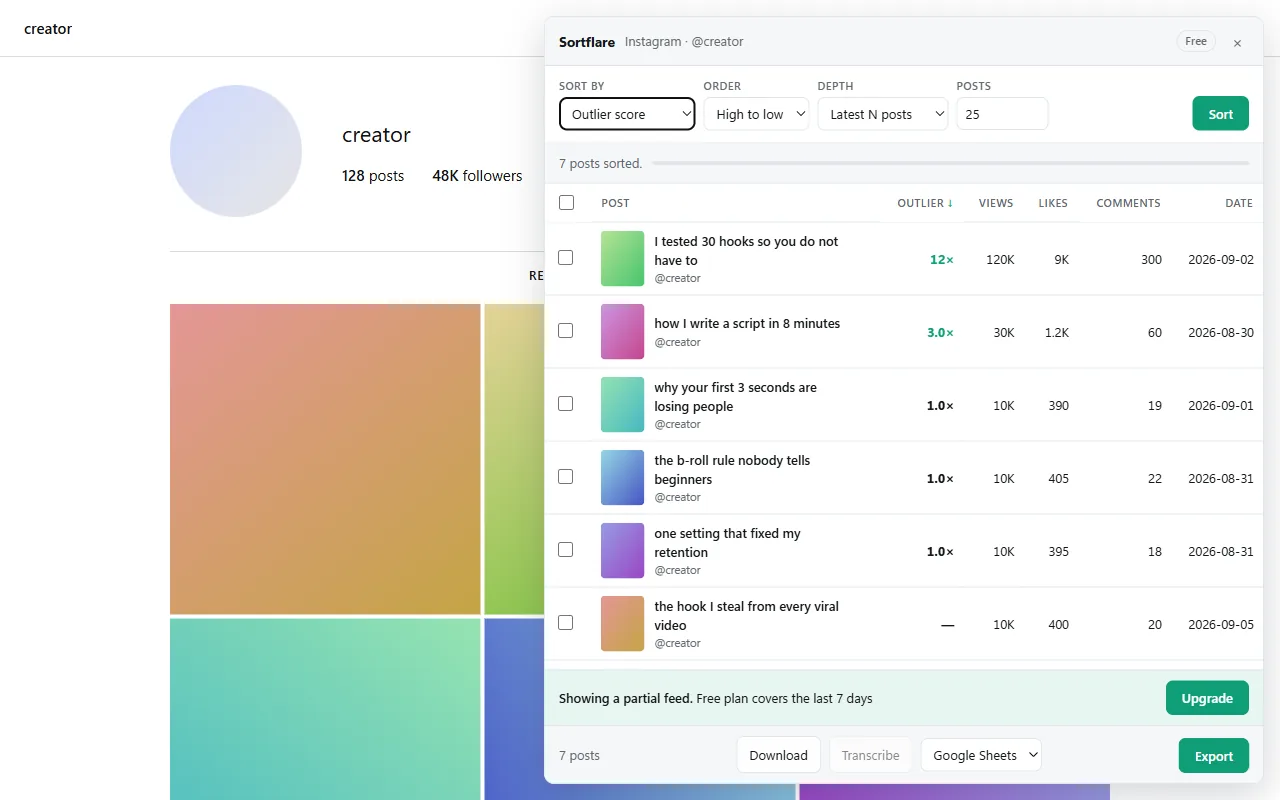
The panel lists the Reels from most to least viewed, with views, likes, comments and the posting date on every row. Click a row to open that Reel. The grid on the page stays as it was; refresh and it is untouched.
Most viewed is not the same as most successful
Views mostly tell you how big an account is. A creator with two million followers gets a million views on an ordinary Tuesday. If you are looking for what to make next, sort by outlier score instead: each Reel's views divided by the median views of that creator's recent Reels. A 6× is a Reel that pulled six times the account's normal, which is the one worth studying. The guide to finding viral Reels in your niche walks through that method.
How far back it goes
The free plan sorts the latest 25 posts or the last 7 days of any account. Signed in, you also get one scan a day at Pro depth. Pro sorts the latest 50, 200 or 1,000 posts, a number you choose, or everything the account has ever posted, over any date range.
What to do with the list
- Export it to Google Sheets, Excel, CSV or JSON, with views, likes, comments, caption and link per Reel. See exporting Instagram posts.
- Download the Reels you picked, one or all of them, without a watermark.
- Transcribe them to read the hooks side by side. See transcribing Reels in bulk.
Questions
Can you see someone's most viewed Reels on Instagram without an extension?
Only by reading the view counts on their Reels tab and comparing them yourself. Instagram has no sort option for anyone's Reels, including your own grid.
Can I see my own most viewed Reels?
Yes. Instagram's Insights can rank your own content for a chosen period. Sortflare does the same for any account you can see, which is what you need to study competitors.
Does the account owner know I looked?
No. Sortflare reads what your own signed-in tab has already loaded and reorders it on your screen. It never likes, follows, comments or posts.
Does it work on private accounts?
Only on private accounts you follow, because those are the only ones Instagram shows you. Sortflare does not get around anything.
Does it work in the Instagram app?
No. Sortflare is a desktop browser extension for Chrome, Edge, Brave, Arc and Opera. It works on instagram.com.
Free to install. No account to start.
The free plan sorts the latest 25 posts or the last 7 days, exports everything and downloads without limits — and, signed in, runs one Pro scan a day. Pro is $29 once, for life.